SBA Loan Calculator: Estimate Your Monthly Payments
An SBA loan calculator helps small business owners estimate what a loan might cost before they apply. Instead of guessing, you can enter a few basic inputs—loan amount, interest rate, and repayment term—and see an estimated SBA loan monthly payment, total interest, and total repayment.
The estimate is not a lender quote. It’s a planning tool. Actual SBA loan repayment terms, interest rates, and fees depend on the participating lender, the SBA program, and the borrower’s qualifications.
This article explains how an SBA loan payment calculator works, the formula behind it, and how to interpret the results.
SBA Loan Calculator: Estimate Your Monthly Payments
How the SBA Loan Payment Is Calculated
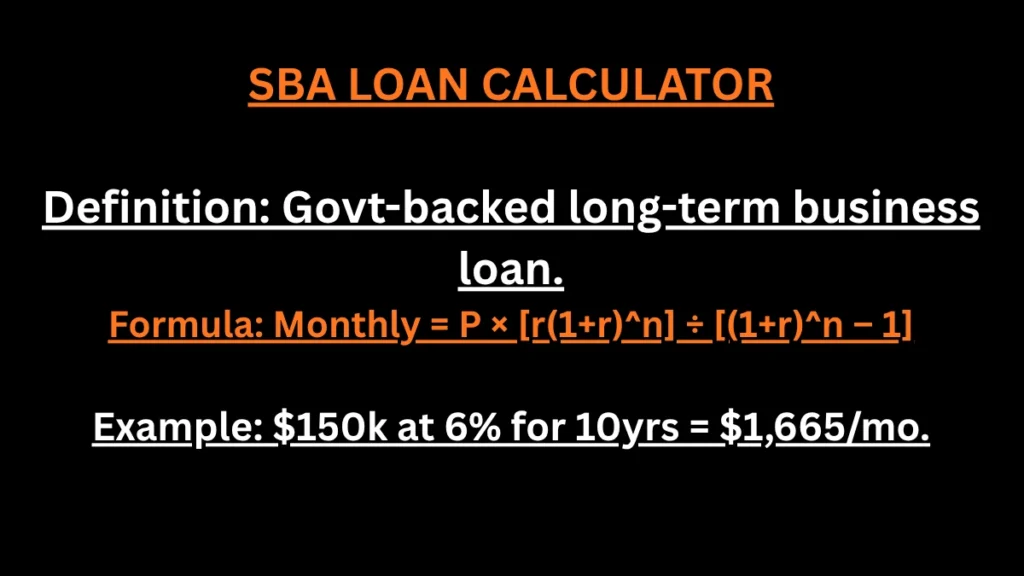
The monthly payment is calculated using the standard fixed-rate amortization formula:
M = P × [r(1 + r)n] ÷ [(1 + r)n − 1]
Where:
- M = monthly payment
- P = loan principal
- r = monthly interest rate
- n = total number of monthly payments
What Is an SBA Loan Calculator?
An SBA loan calculator is a tool that estimates the payment and cost of an SBA-backed business loan. It typically calculates:
- Monthly payment
- Total principal
- Total interest
- Total repayment
- Estimated financing cost
Small business owners use an SBA business loan calculator before applying so they can compare scenarios, evaluate affordability, and understand how different terms affect the payment. Lenders, business advisors, and accountants also use SBA loan payment estimates when helping clients plan.
Most calculators require the same basic inputs:
- Loan amount
- Annual interest rate
- Loan term or repayment period
- Payment frequency
Some SBA loan cost calculators also allow you to add fees or adjust the repayment structure. The more inputs a calculator supports, the closer the estimate tends to be to a lender’s actual numbers—though it will still be an estimate.
How the SBA Loan Calculator Works
The calculator takes your inputs and applies a standard amortization formula. Each input affects the result in a predictable way.
Loan amount. A larger loan increases the monthly payment and total interest. The relationship is roughly proportional—double the loan amount and the payment roughly doubles, assuming the same rate and term.
Interest rate. A higher SBA loan interest rate increases both the monthly payment and total interest. Even a small difference in rate can change the total cost over a multi-year term.
Loan term. A longer SBA loan term spreads the principal over more payments. This lowers the monthly payment but usually increases total interest paid.
Repayment period. Some SBA loans have a draw period or interest-only period before full amortization begins. If a calculator doesn’t account for this, the estimate may not match the actual repayment schedule.
Fees when applicable. Fees such as the SBA guarantee fee or lender fees are usually paid upfront, but some may be financed into the loan. Adding them to the principal increases both the monthly payment and total interest.
Changing any single input changes the output. That’s why running several scenarios—different rates, terms, and loan amounts—gives a better picture than a single estimate.
SBA Loan Payment Formula
The standard formula for a fixed-rate, fully amortizing installment loan is:
M = P × [r(1+r)^n] / [(1+r)^n − 1]
Where:
- M = monthly payment
- P = principal (loan amount)
- r = monthly interest rate (annual rate ÷ 12)
- n = number of monthly payments (loan term in years × 12)
This is the same amortization formula used for most fixed-rate installment loans, including many SBA-backed loans. It assumes equal monthly payments over the full term.
Not every SBA loan follows this exact structure. Some loans have variable rates, interest-only periods, or different repayment schedules. The formula is a useful starting point, but it may not precisely represent every SBA loan structure.
How to Calculate SBA Loan Payments
Here’s a hypothetical example using the standard formula.
Inputs:
- Loan amount: $150,000
- Annual interest rate: 9%
- Loan term: 10 years
Step 1: Convert the annual rate to a monthly rate.
9% ÷ 12 = 0.75% per month, or 0.0075 as a decimal
Step 2: Determine the number of payments.
10 years × 12 = 120 monthly payments
Step 3: Apply the formula.
M = 150,000 × [0.0075(1.0075)^120] / [(1.0075)^120 − 1]
(1.0075)^120 ≈ 2.4514
Numerator: 0.0075 × 2.4514 ≈ 0.018386
Denominator: 2.4514 − 1 = 1.4514
M = 150,000 × (0.018386 ÷ 1.4514) ≈ 150,000 × 0.012668 ≈ $1,900
The estimated monthly payment is approximately $1,900.
Total repayment over 10 years: $1,900 × 120 = $228,000
Total interest: $228,000 − $150,000 = $78,000
This example is hypothetical and for illustration only. It does not include fees, and it assumes a fixed rate with equal monthly payments. Actual SBA loan payments may differ.
What Affects an SBA Loan Monthly Payment?
Several factors change the monthly payment.
Loan amount. The most direct factor. Larger loans mean larger payments.
Interest rate. Higher rates increase the payment and total interest. Rates can be fixed or variable.
Repayment term. Longer terms reduce the monthly payment but increase total interest. Shorter terms do the opposite.
Fees. The SBA guarantee fee and lender fees can be paid upfront or financed. If financed, they increase the principal and the payment.
Loan structure. Interest-only periods, draw periods, and variable rates change how payments are calculated and when they change.
Payment frequency. Most SBA loans are paid monthly, but some structures allow different frequencies.
Lender requirements. Participating lenders may set their own terms within SBA guidelines, which affects the final payment.
A longer term reduces the monthly payment, which can help cash flow. But it also means paying more interest over the life of the loan. The right balance depends on the business’s cash flow and long-term plans.
SBA Loan Interest Rates and Loan Terms
Actual SBA loan interest rates and repayment terms vary. They depend on:
- The specific SBA program (7(a), 504, microloan, etc.)
- The participating lender
- Loan size
- Borrower qualifications
- Repayment structure
- Applicable SBA rules
- Market conditions
Some SBA loans use variable rates tied to a benchmark. Others use fixed rates. Loan terms vary by use of proceeds—working capital, equipment, real estate, and business acquisition may each have different maximum terms.
No calculator can promise a specific rate. An SBA loan interest calculator produces an estimate based on the rate you enter. The actual rate comes from the lender.
SBA 7(a) Loan Payment Considerations
The SBA 7(a) program is the most common SBA loan type. Borrowers often use an SBA 7(a) loan calculator to estimate the monthly payment before applying.
An SBA 7(a) monthly payment estimate can help with planning, but it may differ from a lender quote because of:
- Fees, including the SBA guarantee fee
- Rate structure (fixed vs. variable)
- Loan-specific terms
- Lender underwriting
- Repayment structure
Not every SBA 7(a) loan has identical terms. Two businesses borrowing the same amount on the same day could receive different rates and terms based on their qualifications and the lender’s underwriting.
SBA Loan Costs and Fees
Beyond the monthly payment, SBA loans involve costs. These can include:
- SBA guarantee fee
- Lender fees
- Closing costs
- Application-related costs
- Other financing expenses
The SBA guarantee fee is set by the SBA and varies by loan size and term. Lender fees vary by lender. Closing costs may include appraisal, title, and legal fees.
Fees affect the overall borrowing cost. Some are paid upfront; others may be financed into the loan. An SBA loan calculator with fees gives a more complete picture than one that only calculates principal and interest.
How Much SBA Loan Can I Afford?
Affordability depends on the business’s cash flow, not just the loan amount. Key factors include:
- Business cash flow
- Existing debt
- Monthly payment
- Total debt service
- Debt service coverage
- Operating expenses
- Available cash
Lenders typically evaluate SBA loan debt service coverage—the ratio of available cash flow to total debt payments. A higher ratio suggests more capacity to repay. Lenders also review credit, collateral, industry experience, and business financials.
No calculator can tell you exactly how much you’ll qualify for. Lenders use their own underwriting and qualification standards. An SBA loan affordability calculator can help you test scenarios, but the final loan amount is determined by the lender.
SBA Loan Calculator vs. Actual Lender Quote
A calculator and a lender quote serve different purposes.
A calculator is for planning. It helps you compare scenarios and understand how rates, terms, and fees affect payments.
A lender quote is the actual offer. The lender determines:
- Interest rate
- Fees
- Loan structure
- Repayment terms
- Eligibility
- Underwriting requirements
Use the calculator to narrow your options, then request quotes from participating lenders to see actual terms. The two numbers may differ, and that’s expected.
Frequently Asked Questions
1. What is an SBA loan calculator?
A tool that estimates the monthly payment, total interest, and total repayment of an SBA-backed loan based on inputs like loan amount, rate, and term.
2. How do I calculate an SBA loan payment?
Use the standard amortization formula: M = P × [r(1+r)^n] / [(1+r)^n − 1]. Enter the principal, monthly rate, and number of payments.
3. What is the SBA loan payment formula?
M = P × [r(1+r)^n] / [(1+r)^n − 1], where P is principal, r is the monthly rate, and n is the number of monthly payments.
4. How much is an SBA loan monthly payment?
It depends on the loan amount, rate, and term. A $150,000 loan at 9% over 10 years is roughly $1,900 per month, but actual payments vary.
5. Does an SBA loan calculator include interest?
Most calculators include interest in the monthly payment and total repayment. Some also show total interest separately.
6. Can an SBA loan calculator include fees?
Some do. If the calculator allows you to add fees to the principal, the estimate will be closer to the actual cost.
7. How does an SBA 7(a) loan payment work?
Most SBA 7(a) loans are repaid in monthly installments over a set term. The payment depends on the rate, term, and loan amount.
8. Does a longer SBA loan term reduce the monthly payment?
Yes. A longer term lowers the monthly payment but usually increases total interest paid.
9. How much SBA loan can I afford?
It depends on your business cash flow, existing debt, and the lender’s underwriting. Use a calculator to test scenarios, then confirm with a lender.
10. How is SBA loan interest calculated?
Interest is calculated on the outstanding principal. For fixed-rate loans, the amortization formula determines how much of each payment goes to interest versus principal.
11. Can I calculate total SBA loan interest?
Yes. Multiply the monthly payment by the number of payments, then subtract the principal. The result is total interest.
12. Why is my calculator estimate different from a lender quote?
Because lenders apply their own rates, fees, and underwriting. The calculator uses the inputs you provide, which may not match the lender’s actual terms.
Related Calculator Topics
If you’re estimating SBA financing costs, other calculators can help. An SBA loan payment calculator focuses on monthly payments. A business loan calculator can compare different loan types. A loan amortization calculator shows how each payment splits between principal and interest. A loan interest calculator isolates interest cost. A debt service calculator helps evaluate total debt obligations.
Together, these tools give a fuller picture of financing costs than any single calculator alone.
Disclaimer
Disclaimer: This SBA loan calculator provides estimates for educational purposes only and is not a loan offer, approval, or financial advice. Actual SBA loan rates, fees, terms, eligibility, and payments vary by lender and borrower.